QuickBooks for Cannabis Business: 2026 Finance Guide
2026 update: what rescheduling changed for 280E (reviewed October 2026)
Effective April 22, 2026, a DOJ/DEA final order moved marijuana covered by a qualifying state medical license (and FDA-approved marijuana drugs) to Schedule III. Section 280E only applies to Schedule I and II substances, so state-licensed medical cannabis activity is generally no longer subject to 280E going forward. Adult-use cannabis remains in Schedule I and fully subject to 280E. The DEA proceeding to reschedule all marijuana was temporarily stayed in October 2026, and Treasury/IRS guidance on transition years and mixed medical/adult-use businesses is still pending.
Check where your business stands in about a minute.
QuickBooks is the accounting platform used by approximately 90% of cannabis businesses, making it the de facto standard for cannabis business bookkeeping despite having zero native support for Metrc integration, batch tracking, or IRS Section 280E compliance. That gap is not a dealbreaker. It is a setup problem. QuickBooks Online and QuickBooks Desktop Premier Plus both serve cannabis operators effectively when paired with the right third-party integrations and a properly structured chart of accounts. Multi-state operators managing multiple legal entities face additional consolidation demands that QuickBooks alone cannot meet. The platform is the foundation. What you build on top of it determines whether your financials are defensible.
How does QuickBooks for cannabis business handle software integrations?
QuickBooks does not natively handle Metrc, batch tracking, or compliant COGS calculations. That is not a flaw unique to cannabis. QuickBooks was built for general business accounting. The solution is pairing it with a cannabis ERP or automation platform that feeds validated, real-time data directly into QuickBooks.
The ideal setup pairs QuickBooks with a cannabis ERP that handles Metrc and batch tracking, then pushes that validated data into QuickBooks. This prevents manual data entry errors and keeps your ledger current without a controller touching every transaction. Platforms like Distru and LeafLogix handle the seed-to-sale layer. QuickBooks handles the financial layer.

The operational impact is measurable. Integrating cannabis ERP platforms with QuickBooks reduces month-end reconciliation time from over 8 hours to under 1 hour. That is more than 87% time savings on close. For a finance team managing multiple dispensary locations, that difference is the gap between a two-day close and a two-week close.
Key benefits of real-time QuickBooks cannabis integration:
- Payment sync with detailed coding: Every transaction posts with the correct class, department, and vendor match automatically.
- Elimination of double-entry: AP workflows push directly to QuickBooks without manual re-keying.
- Real-time cash position: Payment processing lags get reconciled at the source, not after the fact.
- Audit trail integrity: Every line item carries a source reference traceable back to the POS or ERP.
Pro Tip: Set your ERP-to-QuickBooks sync to run at least twice daily. A single daily sync creates a 12-hour blind spot in your cash position, which matters when you are managing tight liquidity across multiple locations.
What are the multi-entity consolidation challenges in QuickBooks?
Most cannabis companies operate multiple legal entities. A cultivation license, a processing license, and a retail dispensary license in the same state often sit in separate LLCs for liability and regulatory reasons. Add a second state, and you are managing four to six QuickBooks files simultaneously.
QuickBooks Online lacks native consolidated reporting across entities. That means no consolidated P&L, no intercompany elimination, and no standardized chart of accounts enforcement across files without manual intervention. Operators who try to manage this with spreadsheets introduce reconciliation errors every single month.
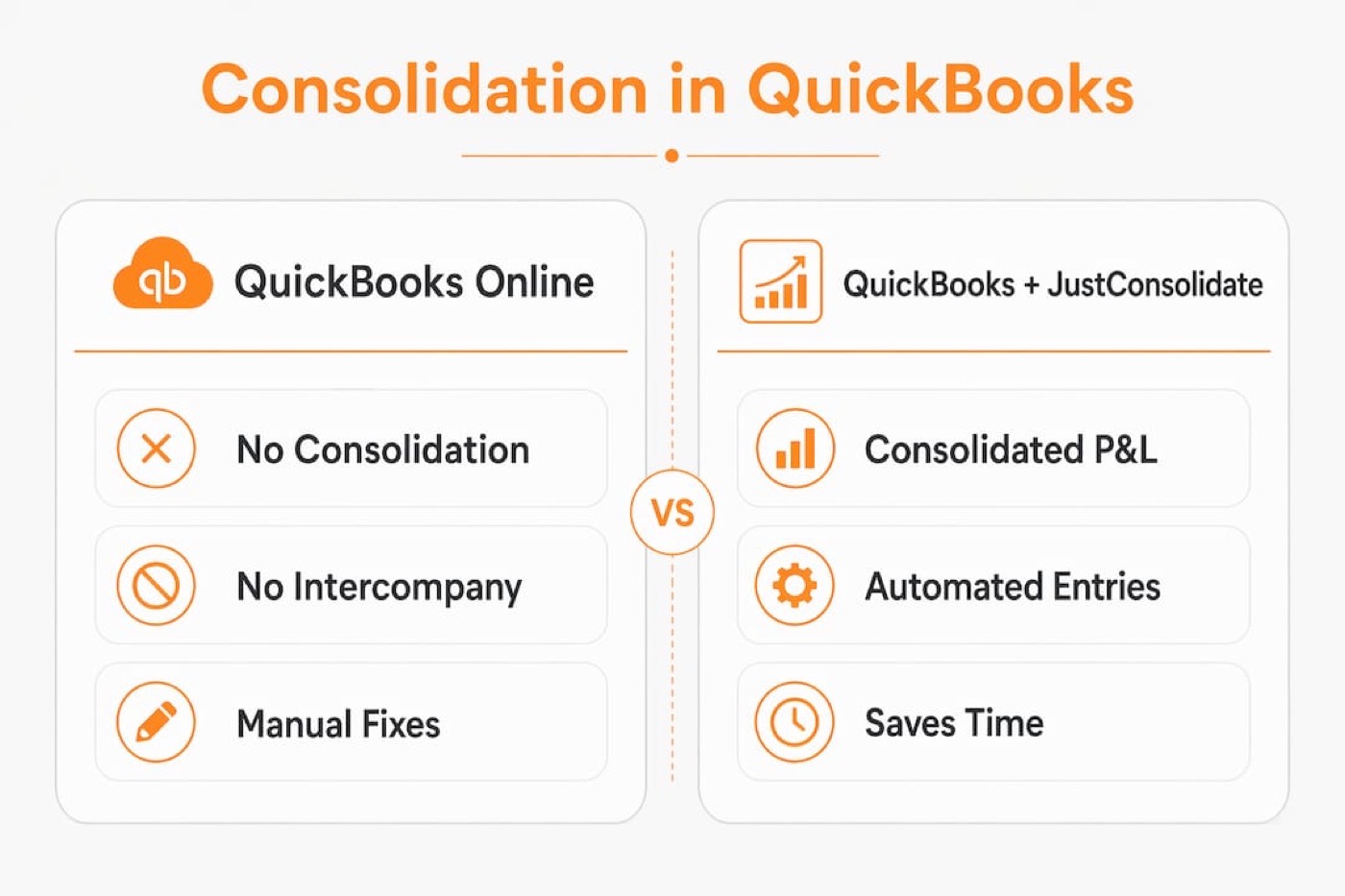
Add-ons like JustConsolidate automate financial consolidation and intercompany eliminations directly from QuickBooks data. The prerequisite is a mapped, standardized chart of accounts across every entity. Without that mapping, consolidation tools produce garbage output regardless of how sophisticated the software is.
Here is the sequence that works:
- Standardize the chart of accounts across all entities before any integration goes live. Account numbers, naming conventions, and class structures must match.
- Map intercompany accounts explicitly. Management fees, intercompany loans, and shared service allocations each need dedicated accounts.
- Run monthly eliminations before producing consolidated financials. Intercompany revenue and expense must zero out.
- Validate entity-level reports first. A consolidated report is only as clean as the underlying entity files.
| Feature | QuickBooks Online (standalone) | QuickBooks + JustConsolidate |
|---|---|---|
| Consolidated P&L | Not available | Automated |
| Intercompany eliminations | Manual spreadsheet | Automated |
| Multi-state COA standardization | Manual | Enforced via mapping |
| Month-end close time | Extended | Reduced significantly |
| Audit trail for eliminations | None | Documented |
The initial COA mapping is critical and time-intensive. Errors at this stage cause weeks of manual fixes downstream. Get it right once. Do not patch it later.
How does Section 280E compliance work inside QuickBooks?
IRS Section 280E disallows deductions for ordinary business expenses when a business traffics in Schedule I controlled substances. For cannabis operators, that means only COGS is deductible. Every other expense, rent, payroll, marketing, and utilities, is non-deductible at the federal level. The difference between a defensible 280E position and an audit liability is your chart of accounts.
A tax-aware chart of accounts that separates COGS from non-deductible expenses is the single most critical accounting structure in QuickBooks for a cannabis business. This is not a software feature. It is a design decision you make before you record a single transaction. For a deeper breakdown of which expenses fall on which side of that line, the Cannabisbusinessminds guide on non-deductible cannabis expenses is worth reading before you finalize your COA.
Practical structure inside QuickBooks for 280E compliance:
- Use Classes or Departments to separate cultivation, processing, and retail operations. Each class carries its own cost pool, which matters when allocating shared overhead.
- Tag every expense at entry with the correct class. Retroactive reclassification is possible but creates audit risk if the original coding is inconsistent.
- Build a monthly 280E summary report in QuickBooks that shows total COGS versus total non-deductible expenses. Your tax preparer needs this every quarter, not just at year-end.
- Integrate POS and Metrc data to validate COGS figures. If your QuickBooks COGS does not reconcile to your Metrc inventory movement, you have a problem before the IRS does.
Pro Tip: Document the business purpose for every expense coded to COGS. QuickBooks stores memo fields on every transaction. Use them. An auditor asking why a specific cost is in COGS gets a memo, not a verbal explanation.
Proper expense documentation for 280E is not optional. It is the difference between a clean audit and a six-figure tax adjustment.
How should cannabis operators manage cash flow forecasting in QuickBooks?
Cash flow and profit are not the same number in a cannabis dispensary. Revenue recognition timing, payment processing lags, and tax liability accruals all create gaps between what QuickBooks shows as income and what is actually available to spend.
State interest and penalties on unpaid cannabis tax liabilities can reach 25% annually. That rate makes mismanaged sales tax a faster path to insolvency than most operational mistakes. The fix is structural, not behavioral.
Operational cash flow controls that belong in every cannabis QuickBooks setup:
- Dedicated sales tax bank account: Move collected sales tax to a separate account on the day it is collected. Never commingle it with operating funds.
- 13-week rolling cash forecast: Build this directly from QuickBooks data, segmented by sales channel. Delivery, retail, and wholesale each have different payment lag profiles.
- Revenue recognition lag tracking: Operators must distinguish actual cash received from recognized revenue because payment lags differ by channel. A debit card transaction may not settle for 48–72 hours. Your cash position report needs to reflect that.
- Separate cash flows by entity: In a multi-entity structure, consolidated cash visibility requires entity-level forecasts that roll up, not a single blended view.
“Mismanaging collected sales tax funds for operations risks license revocation and liquidity crises; maintaining a 13-week rolling cash forecast is critical for operational stability.” — GreenGrowth CPAs
Operators who misuse sales tax funds for operations place their licenses at risk. That is not a cash flow problem. That is a license problem. The QuickBooks setup needs to make that segregation automatic, not discretionary.
What are the most common QuickBooks pitfalls in cannabis finance?
The errors that create the most damage in cannabis QuickBooks setups are not complex. They are setup failures and discipline failures that compound over time.
-
Incorrect COA mapping at launch. Failing to map charts of accounts correctly leads to permanent reporting inconsistencies that require lengthy manual fixes. Fix the structure before you go live. Patching a broken COA while the business is running costs ten times more than getting it right upfront.
-
Mixing accrual revenue with cash position assessment. QuickBooks accrual-basis P&L shows revenue when earned. Your cash position shows what cleared the bank. Using the P&L to make operational spending decisions is how operators run out of cash while showing a profit.
-
Skipping daily cash reconciliations. Daily reconciliations and audit binders containing receipts and deposit logs are required for IRS and state audit defense. A weekly reconciliation lets variances compound. A monthly reconciliation is an audit liability.
-
No three-way match protocol. Auditors require a three-way match between POS records, Metrc, and the financial ledger. If those three sources do not agree daily, you are building a reconciliation problem that surfaces at the worst possible time.
-
Ignoring QuickBooks version support timelines. QuickBooks Desktop is not going away in 2026, but older versions are losing support. Cannabis operators on legacy Desktop versions face security and integration risks that compound as third-party add-ons drop compatibility.
Pro Tip: Build your audit binder in real time, not at year-end. QuickBooks allows document attachments on transactions. Attach the deposit slip, the POS report, and the Metrc transfer confirmation to each day’s entry. An auditor pulling a sample gets everything in one place.
For a structured approach to dispensary bookkeeping compliance, Cannabisbusinessminds has a detailed walkthrough of the daily and monthly workflows that keep QuickBooks audit-ready.
What I have learned from QuickBooks in cannabis accounting
QuickBooks dominates cannabis accounting for a practical reason. It works well enough, integrates with enough tools, and is familiar to enough accountants that replacing it rarely makes sense. What I have seen fail, repeatedly, is the assumption that QuickBooks handles cannabis complexity out of the box.
The chart of accounts is where 280E compliance either holds or falls apart. Software does not make that decision. The person who sets up the COA makes that decision. I have reviewed cannabis financials where the COA was copied from a retail business template and never adjusted for 280E. The tax exposure in those cases was not a rounding error.
Multi-entity consolidation is the other place where operators underestimate the setup cost. The first time you try to produce a consolidated P&L across four entities using spreadsheets, you understand why the mapping work upfront is worth every hour. The operators who skip that step spend more time fixing it later than they saved by rushing.
Cash forecasting is where I see the most operational damage. Clean QuickBooks data feeds a reliable 13-week model. Dirty QuickBooks data produces a forecast that gives false confidence. The license risk from mismanaged sales tax is real. I have seen it happen. The cannabis bookkeeping best practices that prevent it are not complicated. They require consistency, not sophistication.
The operators who get the most out of QuickBooks treat it as infrastructure, not a reporting tool. They build the structure correctly, integrate the right data sources, and reconcile daily. Everything else follows from that discipline.
— JN
Take your cannabis financial management further with Cannabisbusinessminds
QuickBooks is the starting point. The operators who build defensible, profitable financials go deeper on inventory costing, cost accounting, and 280E-aligned expense structures.

Cannabisbusinessminds has built a library of resources specifically for cannabis finance professionals who need more than general accounting guidance. The cannabis inventory costing guide covers what finance pros must know about COGS calculation under 280E. The cost accounting guide walks through the full U.S. industry framework for allocating costs across cultivation, processing, and retail. For a broader foundation, the cannabis accounting hub covers the full scope of financial management for dispensaries and multi-license operators. These are the resources that sit behind the QuickBooks setup decisions that actually matter.
FAQ
Does QuickBooks work for cannabis businesses?
QuickBooks is used by approximately 90% of cannabis businesses, but it requires third-party integrations for Metrc, batch tracking, and 280E compliance. It works effectively when configured with a tax-aware chart of accounts and the right cannabis ERP.
What is the best QuickBooks version for a dispensary?
QuickBooks Online is the most common choice for dispensaries due to its integration ecosystem, while QuickBooks Desktop Premier Plus suits operators needing more granular inventory controls. The right version depends on your integration requirements and whether you manage multiple entities.
How does Section 280E affect QuickBooks setup?
Section 280E requires a chart of accounts that cleanly separates COGS from non-deductible operating expenses. This tax-aware COA structure is the foundation of 280E compliance inside QuickBooks and must be designed before the first transaction is recorded.
Can QuickBooks handle multi-entity cannabis operations?
QuickBooks Online does not offer native consolidated reporting across entities. Add-ons like JustConsolidate automate intercompany eliminations and consolidation, but they require a standardized chart of accounts mapped across all entities first.
How often should cannabis operators reconcile QuickBooks?
Daily reconciliations are the standard for audit readiness. Three-way matching between POS records, Metrc, and the QuickBooks ledger must align every day to prevent compounding variances and support IRS or state audit defense.
Recommended
- Cannabis Accounting – Cannabis Business Minds
- Master Cannabis Accounting Best Practices for 2025 Success – Cannabis Business Minds
- 7 Essential Cannabis Bookkeeping Best Practices for Success – Cannabis Business Minds
- Blog – Cannabis Business Minds
This article is general education, not tax, legal or accounting advice. Cannabis rules change quickly; confirm how they apply to you with a qualified cannabis CPA or attorney.